
Business Contact Enrichment — Instantly Get Name, Title, Email, Phone & LinkedIn Profile

Auto-detect URLs or keywords to bulk extract full metadata for YouTube videos, channels & playlists. Download subtitles & comments, export to JSON/CSV. Perfect for market research & competitor analysis.
YouTube Scraper helps you collect publicly available data from YouTube at scale and turn it into structured results without building or maintaining your own scraping workflow.
Enter a YouTube URL or search keyword to collect the data you need across different content types.
You can use it to:
Track competitor channels, publishing activity, views, likes, comments, and subscriber counts to compare content performance.
Search YouTube by keyword and collect matching videos to identify popular topics, formats, titles, and creators.
Find videos related to your company, product, or campaign and analyze how your brand appears across YouTube.
Collect channel and video engagement data to evaluate creators before partnerships or campaigns.
Extract available subtitles and transcripts for content analysis, research, summarization, or AI workflows.
Collect public comments to understand recurring questions, opinions, feedback, and audience reactions.
| 📝 Video Title | 🔗 Video URL |
| 🆔 Video ID | 📽️ Video Type |
| 👀 View Count | 👍 Like Count |
| 💬 Comment Count | ⏱️ Duration |
| 📅 Publish Date | 🖼️ Thumbnail |
| 📺 Channel Name | 🌐 Channel URL |
| 📈 Subscriber Count | 📝 Video Description |
| 🔗 Description Links | 📍 Video Location |
| 🖍️ Subtitles | 📄 Transcript |
| 💬 Top-Level Comments | 📡 Live Status |
| 💰 Monetization Status | 📺 Available Video Qualities |
Available fields can vary depending on the video and information publicly available on YouTube.
You can use different types of YouTube URLs in the same scraper.
| 📹 Video URL | Extract details from a single video or Short |
| 📺 Channel URL | Collect videos, Shorts, and streams from a channel |
| 📋 Playlist URL | Extract videos contained in a playlist |
| 🔎 Search URL | Collect videos from an existing YouTube search |
| 🔑 Search Keyword | Search YouTube and extract matching results |
Note: If both a URL and search keywords are entered, the system will prioritize crawling based on the URL.
Supports scraping public data via YouTube URLs or search keywords. You can choose regular videos, Shorts, or live streams based on the target content, and enable subtitles, comments, and search filters as needed.
Enter one or more search keywords to get the corresponding YouTube search results.
For example:
You can separately set the maximum number of results to retrieve for each search term:
You can also use YouTube search filters to further narrow the results, such as:
Search filters only apply to keyword searches or YouTube search results, and do not apply to direct video URLs.
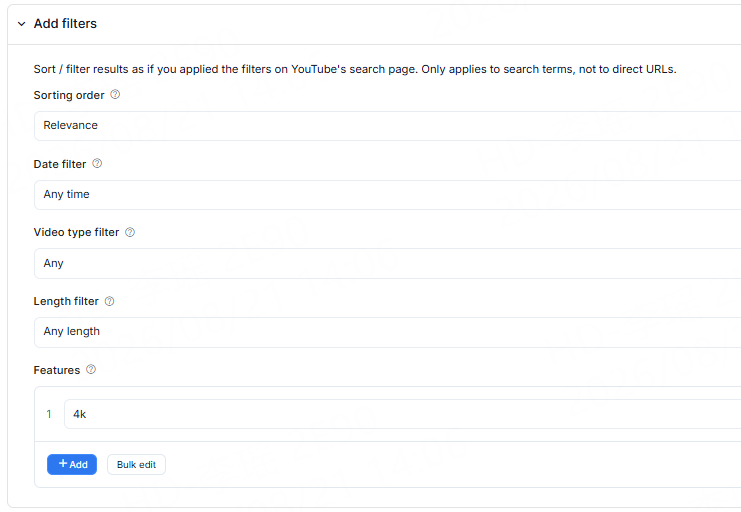
Paste one or more YouTube URLs directly. CoreClaw automatically identifies the URL type and retrieves the corresponding data.
Supported:
| Input Type | Content Retrieved |
|---|---|
| Video URL | Get details for a single regular video, Short, or live stream |
| Channel URL | Get public videos, Shorts, and live streams from a channel |
| Playlist URL | Get public videos from a playlist |
| YouTube Search URL | Get video results from the search page |
For example:
There is no need to specify the URL type manually.
You can separately control the maximum number of results for different content types:
When set to 0, the corresponding content type will not be retrieved.
When scraping with a channel URL, you can filter videos by publish date.
For example:
The actual applicability of date filters depends on the corresponding input type.
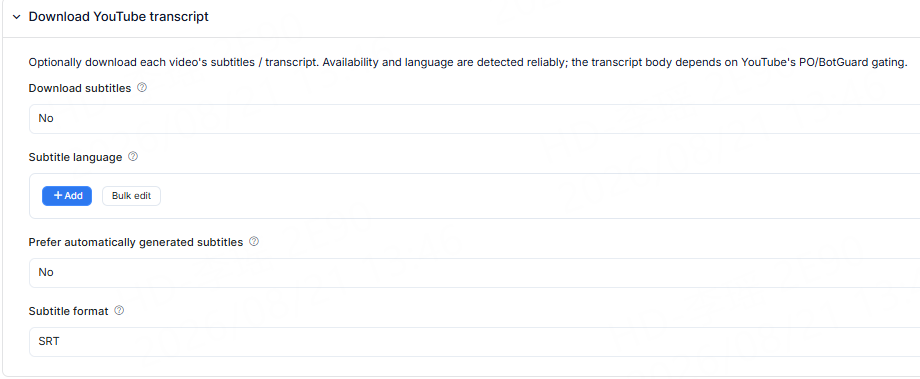
After enabling subtitle retrieval, CoreClaw will attempt to get publicly available subtitles or transcripts from the video.
You can configure:
Can be used for:
Not all YouTube videos provide public subtitles, so some videos may not return subtitle data.
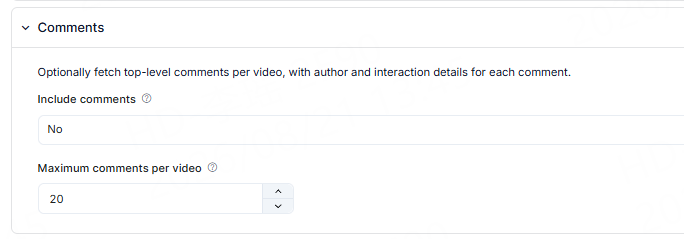
After enabling comment retrieval, you can also get publicly available comment data from the video.
Comment results can include:
Whether comments can be retrieved depends on the video's current public status and comment settings.
CoreClaw returns the scraping results as structured data.
For regular videos, Shorts, and live streams, the core result structure remains consistent; different input methods and additional features add corresponding source, channel, subtitle, or comment fields.
| Field | Description |
|---|---|
| title | Video title |
| id | YouTube video ID |
| url | Video URL |
| type | Content type, such as video, short, or stream |
| description | Video description |
| thumbnail_url | Thumbnail |
| duration | Video duration |
| published_at | Publish time |
| Field | Description |
|---|---|
| view_count | View count |
| like_count | Like count |
| comment_count | Comment count |
| Field | Description |
|---|---|
| channel_name | Channel name |
| channel_url | Channel URL |
| channel_id | Channel ID |
| subscriber_count | Subscriber count |
The specific fields returned may vary depending on the video and the information publicly available on YouTube.
CoreClaw adds corresponding fields based on the data source.
In addition to basic video information, it can also return:
Used to determine which search keyword the video came from.
Can include:
Used to identify which playlist the result came from.
When getting videos through a channel URL, it can also return the corresponding channel information, for example:
After enabling subtitles, subtitle data can be added to the video results:
The languages and subtitle types actually available depend on the subtitles currently provided publicly by the video.
After enabling comments, comment data can be added to the video results:
After the run is complete, the results can be exported in structured formats such as:
Suitable for:
No. You can use CoreClaw YouTube Scraper without a YouTube Data API key. Add a YouTube URL or search keyword, configure the data you want to collect, and start the scraping task directly.
You can extract publicly available YouTube data including video titles, URLs, views, likes, comments count, publish dates, descriptions, channel names, subscriber counts, thumbnails, subtitles, and other available metadata. The exact fields may vary depending on the video, channel, and content type.
Yes. Enter a YouTube channel URL to collect available videos from that channel. You can set the number of regular videos, Shorts, or streams you want to extract and use date or sorting options when supported.
Yes. CoreClaw can extract available YouTube subtitles and transcripts. You can select subtitle languages and use the extracted text for content research, summarization, keyword analysis, AI workflows, or other text-based analysis.
Yes. You can enable comment extraction to collect publicly available top-level comments from YouTube videos, including available information such as comment text, author, publish time, like count, and reply count.
The legality of scraping YouTube depends on what data you collect, how you use it, applicable laws, and YouTube's terms. You should only collect publicly accessible data that you are permitted to process and pay particular attention to copyright, personal data, and privacy requirements.
Explore more popular scrapers from our marketplace

by CoreClaw
Extract public profile data in bulk by entering a URL, including channel name, subscriber count, video count, view count, description and popular videos. Export in CSV or JSON format for competitor analysis and user research, with one-click structured data export.

by CoreClaw
By entering keywords, batch extract public YouTube channel data, including channel name, subscriber count, video count, view count, description, popular videos, etc., outputting in CSV or JSON format. Supports competitor analysis, user research, zero-code operation, one-click export of structured data.

by CoreClaw
Extract public YouTube video comments in bulk via video IDs, including content, commenter details, likes, replies, and author interactions. Export structured data to CSV or JSON with one click for sentiment analysis and user insights.

by CoreClaw
Extract public YouTube video data in bulk via video IDs, including title, description, channel info, views, likes, comments and duration. Export structured data to CSV or JSON with one click for content analysis and statistics.
