Google Maps Scraper
Pricing
Try for freeGoogle Maps Scraper
coreclaw/google-maps-scraper
Pull business records in bulk from Google Maps — covering reviews and reviewer details, photos, contact info (full name, email, job title), opening hours, prices and more. From there, export the data, trigger runs via API, schedule and watch them, or wire the results into your other tools.
Try for Free
2,000 Free Results
📍 What is Google Maps Scraper?
Google Maps Scraper converts public business information on Google Maps into structured data with one click, helping you efficiently complete lead generation, competitor monitoring, and local market research. Say goodbye to manual searches and copying entries one by one — let data collection become automated, standardized, and reusable.
What Can You Use It For?
- Generate Lead Lists: Automatically extract key fields such as business name, website, email, and phone number to quickly build a precise sales lead database, providing reliable data support for outreach and customer development.
- Analyze Competitors: View competitor distribution, rating levels, and review activity by region to clearly grasp the competitive landscape and adjust your strategy in a timely manner.
- Identify Market Opportunities: Analyze business density, rating distribution, and service coverage in specific industries or regions to discover untapped markets or saturation signals and support decision-making.
- Discover Partnership Targets: Filter for high-rated, high-traffic, or high-exposure businesses to lock in quality targets for local partnerships, promotional collaborations, or business expansion.
- Automate Research Workflows: Replace one-off manual searches with stable, exportable automated workflows.
This scraper extends Google Maps data extraction capabilities beyond the limits of the official Google Places API and bypasses the Google Maps restriction of displaying (and scraping) a maximum of 120 places per area.
What Data Does Google Maps Scraper Extract?
| 🔗 Title / Place Name | 📝 Category, Place ID, and Google Maps URL |
| 📍 Address | 🧭 Location, Plus Code, and Exact Coordinates |
| ☎️ Phone Number | 🌐 Website (if available) |
| 📝 Company Contact Info from Website (phone, public email, and social media pages) | 📱 Enriched account info for Facebook, Instagram, YouTube, TikTok, and LinkedIn |
➡️ Detailed Attribute List (attributes) | 🖼️ Image List |
⭐ Average Rating (review_rating) | 📊 Review Count and Rating Distribution |
| 🔓 Open / Closed Status | 🕒 Opening Hours |
| ⏱️ Popular Times: Peak Histogram and Real-time Foot Traffic | 🍽️ Menu |
| 💵 Price Range | 🪑 Reservation Provider Data |
| 🛵 Online Order Availability and Delivery / Pickup Methods | 👥 People Also Search For |
To maximize data collection efficiency, the Google Maps Scraper offers the following capabilities:
- Place and Contact Data: Extract business data from Google Maps, including business names, addresses, contact information, email addresses, social media accounts, ratings, review counts, business categories and opening hours. It also supports exporting extended profile details and full review data.
- Directly Exportable Formats: Export results to spreadsheets, databases, CRMs, BI tools, or internal workflows in 8 formats: CSV, JSON, JSONL, XLS, XLSX, HTML, XML, and RSS.
- Integration with Other Tools: Use webhooks or our MCP server to set up workflow connections with other Workers or third-party tools (such as Make or Zapier)
- Optional Add-ons: Obtain more complete information (such as website contact info, public emails, social pages, reviews, place details, reservation data, etc.)
⬇️ Input
Search Term (Required) — keyword
Used to define the business type or service category to scrape. Supports entering multiple keywords to expand coverage.
It is recommended to use combinations of business keywords with distinct meanings and low overlap to improve data coverage and control runtime.
Avoid using synonym repetitions or words without filtering meaning (such as near me, best), which will not add data but only increase duplicate queries.
Recommended examples:
marketing agency, SEO agency, web design company, consulting firm, IT services, recruitment agency
Not recommended examples:
marketing agency, marketing agencies, digital marketing agency, SEO agency near me, best SEO agency, web design company NYC
🌍 Search Region (Required) — base_location
Used to limit the search scope to a specific city or country. It is recommended to use "city + country" or "state + country".
Examples:
Austin, Texas, USA
New York, USA
Berlin, Germany
Enhancement Features (All Free · Toggle Freely)
- Enabled by Default — Contact Info & Social Enhancement: Automatically visit the business website to extract emails, phone numbers, and other contact info, and enrich Facebook, Instagram, YouTube, TikTok, and LinkedIn social pages. This is the default deep scraping and also the main source of runtime; when only basic business info is needed, you can turn it off entirely to speed up.
- Disabled by Default, Enable as Needed: Email verification, place details, reservation data, online ordering, Google web search results, reviews, and reviewer information.
- The above enhancement items incur no extra charges; the more features you enable, the more complete the data, but processing time will also increase — review scraping, email verification, and contact/social enrichment are particularly noticeable.
⬆️ Output
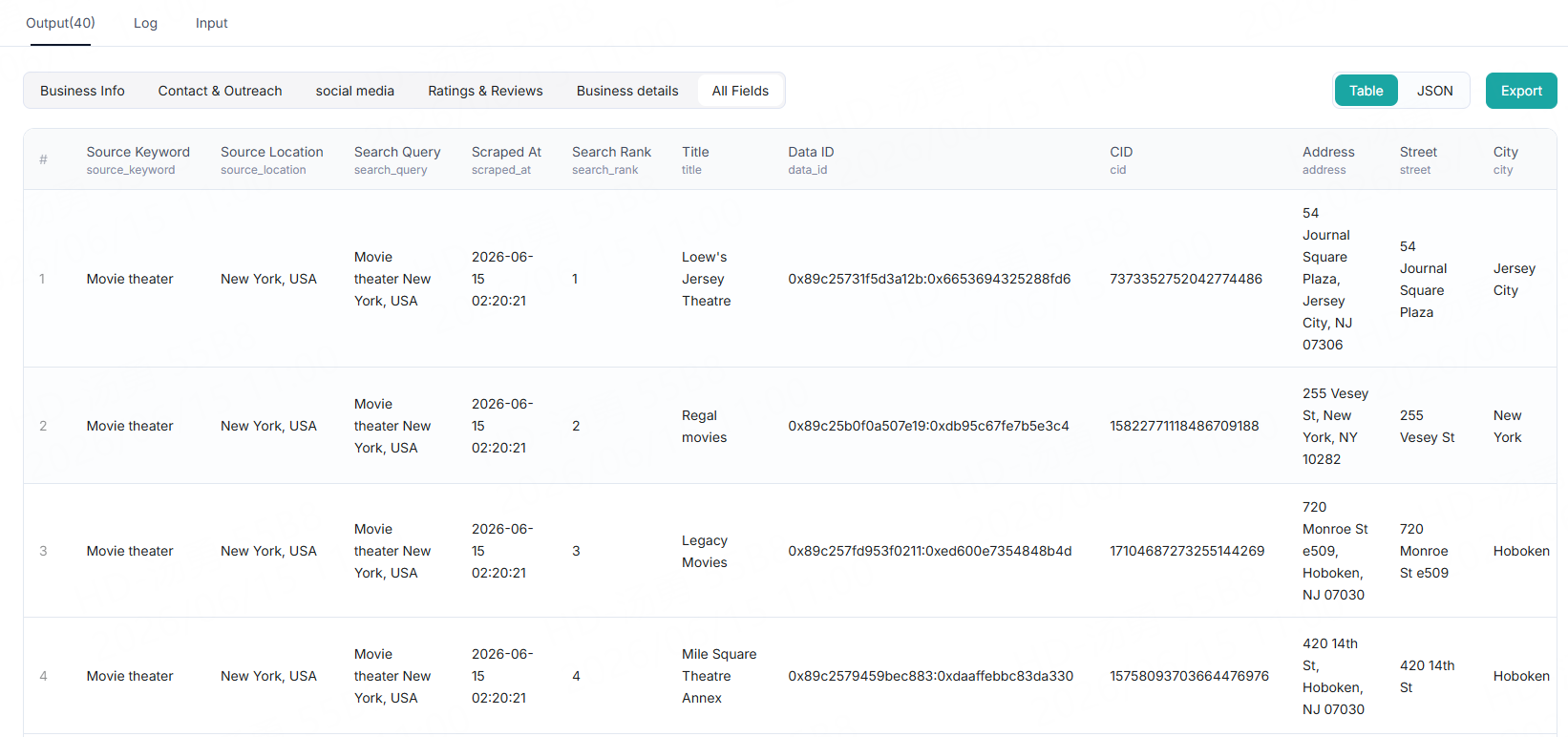
After each successful run, result data is generated. You can view it in the "Output" panel. It is displayed in table format by default, with category tags for easy grouped browsing.
You can also switch to JSON format with one click. For export, you can export data as CSV, JSON, JSONL, XLS, XLSX, HTML, XML, and RSS. Before exporting, you can check or uncheck specific fields as needed, or directly download the full view — including all associated data.
Table View
The table supports multiple browsing methods. You can view the overview, or group and filter by fields such as contact info, location rating, and reviews. Click to view data for the corresponding group.
🧩 Complete JSON Record
When you scrape a place (for example: a dental clinic in Austin, Texas, USA), a complete data record is returned, containing both basic business information and enhanced data you have enabled (such as email verification, ratings, more place details, etc.).
json
📇 Contact & Outreach
Extract merchants’ publicly available contact information and social media accounts, phone numbers sourced from Google Maps, as well as official page links for platforms such as Facebook, Instagram, YouTube, TikTok and LinkedIn, to help your team quickly establish outreach channels.Example structure:
json
📧 Email Verification
When the email_verification feature is enabled, the system automatically verifies emails for each lead and returns email status information in the output. This feature is provided free of charge by CoreClaw with no additional fees.
Email verification results indicate the availability and status of an email address, categorized as follows:
| Status | Description |
|---|---|
| ✅ valid | Email is valid and can receive messages normally |
| ❌ invalid | Email does not exist or is unavailable |
| ❌ disposable | One-time or temporary email address |
| ⚠️ catch_all | Domain accepts all emails, but cannot confirm if the specific email is real |
| ⚠️ unknown | Unable to determine email validity |
| ⚠️ verification_failed | Error occurred during verification |
| ⚠️ not_checked | Verification was not performed |
Business Email Identification
The system also returns the is_business_email field to help you quickly filter business domain emails and precisely target company contacts.
json
📱 Social Platform Data
Google Maps Scraper retrieves social media links for businesses and enriches them with detailed operational data for each platform, including follower count, verification status, industry category, company size, post/video count, etc. This information is directly integrated into the place record.
🔔 Tip: You can also enable this feature for specific platforms only (for example, only Facebook and Instagram).
json
⭐ Ratings and Reviews
Returns the business rating distribution (count per star level), popular times data, and detailed review list (including rating, text, publish time, likes, reviewer info, owner response, etc.).
Reviews are stored in the reviews array. To facilitate table processing, the first three reviews are also flattened into fields such as reviews/0/name, reviews/0/rating, reviews/0/text, reviews/1/*, and reviews/2/*.
Typical use cases: business reputation analysis, competitor comparison, foot traffic pattern insights, user review mining, business activity assessment.
🔔 Tip: Review data (reviews) is not returned for all businesses; it depends on Google Maps data coverage. Popular times (popular_times) relies on Google real-time availability and may be missing for some businesses. Review content, owner responses, and other fields may be empty strings or null values when no data is available.
json
🧾 Business Details
Business operation data on Google Maps, covering opening hours, online reservations, online ordering, menu information, owner information, and similar business recommendations, etc., helping you quickly assess operational maturity and online conversion capability to build a complete local business profile.
🔔 Tip: Online reservations, menu, and other fields vary by business; some businesses may not provide or publicly disclose them. online_order_available only returns true when the business supports online ordering. Opening hours may change due to holidays or temporary adjustments; it is recommended to verify with other data sources.
json
❓ FAQ
How Does Google Maps Scraper Work?
Google Maps Scraper works similarly to manually opening Google Maps, entering a location and search keyword, then viewing and copying business information one by one. The difference is that the script automates the entire process, making it faster and more suitable for large-scale data collection.
During runtime, the script first uses your provided base_location to locate the specified country, city, or region. Then it inputs the search keyword into the Google Maps search box. After that, the script continuously scrolls through search results until it reaches the end of results, the system scrape limit, or the number set by Max Results.
During scraping, each place is processed as an independent result. The script collects visible business information from each place page, such as business name, address, phone number, website, rating, review count, opening hours, category, coordinates, images, social media links, and emails. Collected data is organized into structured results for easy downloading, filtering, analysis, or lead development.
To better understand this process, you can open Google Maps in your browser and search using the same location and keyword. The actions performed by the script are almost identical, except it automates repetitive steps and completes them faster.
What Are the Drawbacks of the Google Maps API?
The official Google Places API is suitable for application features that require supported Google APIs. For bulk market research, local lead development, and review analysis, it may be limited because pricing, quotas, and result pagination are tied to API product restrictions. Scrapers can more flexibly collect publicly available Google Maps page data, but you should still evaluate Google's Terms of Use according to your use case.
Can I Scrape Places from Multiple Locations?
The public input schema accepts one base_location per campaign run. To collect multiple locations, launch multiple runs, or create a CoreClaw workflow that processes each location sequentially and merges exported results downstream.
How Can I Improve Scrape Speed?
Use precise base_location, reduce max_results, keep fetch_reviews off unless reviews are needed, reduce max_reviews_per_place, and only enable website, social, or place detail enrichment when you truly need those fields.
Can Google Maps Scraper Extract Google Reviews?
Yes. Enable fetch_reviews, then set max_reviews_per_place, review_sort_by, review_keyword, and include_reviewer_info as needed.
How Can I Output Each Review on a Separate Row?
The scraper returns reviews as a nested reviews array and flattens the first three reviews into reviews/0/*, reviews/1/*, and reviews/2/* fields. If you need each review on a separate row, export JSON and transform the reviews array in downstream processing.
Can Google Maps Scraper Be Integrated with Other Applications?
Yes. Export CSV, JSON, JSONL, XLS, XLSX, HTML, XML, or RSS from CoreClaw, then import into spreadsheets, databases, CRMs, BI tools, or automation workflows. You can also use the CoreClaw REST API, MCP server, n8n node, or your own automation layer to launch scrape runs, check run status, retrieve paginated results, or export results in the format your workflow requires.
Can Google Maps Scraper Be Used as an API?
Yes. You can run Google Maps Scraper programmatically using the CoreClaw REST API. CoreClaw API requests use the api-key header, with the base URL https://openapi.coreclaw.com.
A typical API workflow is as follows:
- Retrieve scraper details from
/api/scraper, and use the returnedversionand custom parameter schema. - Launch a run using
/api/v1/scraper/run, passingscraper_slug,version,is_async, and placing scraper input underinput.parameters.custom. - Save the returned
run_slug. - Check run status using
/api/v1/run/detail. - Retrieve results using
/api/v1/run/result/list, or export files using/api/v1/run/result/export.
Is Scraping Google Maps Data Legal?
Many web scraping scenarios involve publicly available data, but legality depends on the data, jurisdiction, purpose, and how you handle personal information. Please respect personal data and intellectual property rules, only scrape when you have legitimate grounds, and review Google's Terms of Use according to your use case.
Feedback
We are continuously improving this scraper's performance and coverage. If you find a bug or notice missing fields, please provide input settings, enabled enrichment options, approximate runtime, and a small sample of output. You can provide feedback via the website's online chat or email support@coreclaw.com so we can reproduce the behavior and fix it.
Pricing
Failed results don't count
Rating
4.6
Developer
CoreClaw
Maintained by CoreClaw
Worker Stats
7.1K Total runs
Success rate: 98.20%
Last updated: Jun 12, 2026
Categories
Share
You might also like
Explore more popular scrapers from our marketplace
Google Maps Business Detail Finder(by Detail URL)
by CoreClaw
No-code Google Maps scraper fetches full details of single business. Capture business email, phone, website, social accounts, reviews, opening hours and location data, instantly export complete valid B2B leads.
4.5
185 runs
From $1.2/1,000 results

Google Maps Reviews Scraper(by place detail URL)
by CoreClaw
Google Maps Review Scraper bulk extracts star ratings, text, reviewer details, owner responses, and image URLs. Precisely analyze customer sentiment, monitor competitors, optimize local SEO, and comprehensively boost your business reputation. Supports keyword filtering and multilingual translation, delivers structured data.
4.5
147 runs
From $1.2/1,000 results