
Google Maps fields added: Email, Facebook, Instagram, LinkedIn, YouTube & Twitter/X.

Launch Offer: $9 Starter Credits · Get Up to 10K Results
Enter keywords to instantly acquire B2B lead data from Google Maps. Get business contact name, phone number, official website, address, valid email, ratings, reviews, business hours, category, price range and street view images. Export data directly to Excel for immediate use.
The Google Maps Local Business Leads Scraper helps sales professionals solve one problem: no more manually copying phone numbers and website links one by one from Google Maps. Just enter a keyword and target city, and the tool automatically extracts business names, phone numbers, emails, ratings, and social media accounts in bulk—completing in minutes what would take days manually. Build lead lists ready for cold emails and sales outreach instantly.
Covers 200+ countries worldwide, bypasses Google Maps' official 120-result limit, exports to Excel, requires zero coding knowledge—works out of the box.
The first step in sales is finding potential customers, but building a client list from scratch takes enormous time, and buying third-party databases is costly. The tool supports industry + multi-city batch runs, completing nationwide prospect collection in hours. Get business names, websites, phones, and emails—import directly into CRM and start outreach. Compared to LinkedIn data or ZoomInfo, Google Maps business info is publicly available in real-time with no access restrictions, at minimal cost.
The biggest barrier to building outreach lists is missing contact info—Google Maps doesn't show emails directly, and copying phone numbers one by one doesn't scale. The tool exports all contact details for an entire industry in a target city at once, including emails, phones, and social accounts. Import directly into Instantly, Apollo, or Lemlist to launch personalized cold email sequences. From search to send—fully automated, skipping all manual lookup steps.
Finding clients who truly need SEO services is the hardest part of business development—checking one by one is inefficient and doesn't scale. The tool supports keyword + city batch export, then filter by "no website" or "rating below 3 stars." These businesses are your most urgent prospects for website building and SEO. Get names, phones, and emails—one afternoon to complete client development for an entire city.
Businesses with bad reviews are your most precise target customers, but manually checking ratings on Google Maps is painfully slow. The tool batch-scrapes ratings and review data, filters businesses below 3 stars with one click, and outputs corresponding phones and emails. Start outreach immediately. No more guessing who needs help—the data already did the hardest filtering for you.
Crafting marketing strategies without market data means relying on experience alone—proposals lack. The tool batch-scrapes competitor ratings, review counts, and business status, analyzes business density and reputation gaps in target areas, and generates a quantifiable market picture. Put this real data in client proposals to dramatically boost credibility and close rates.
CoreClaw designs simple, user-friendly scraping tools—no technical background needed. 4 steps to extract data:
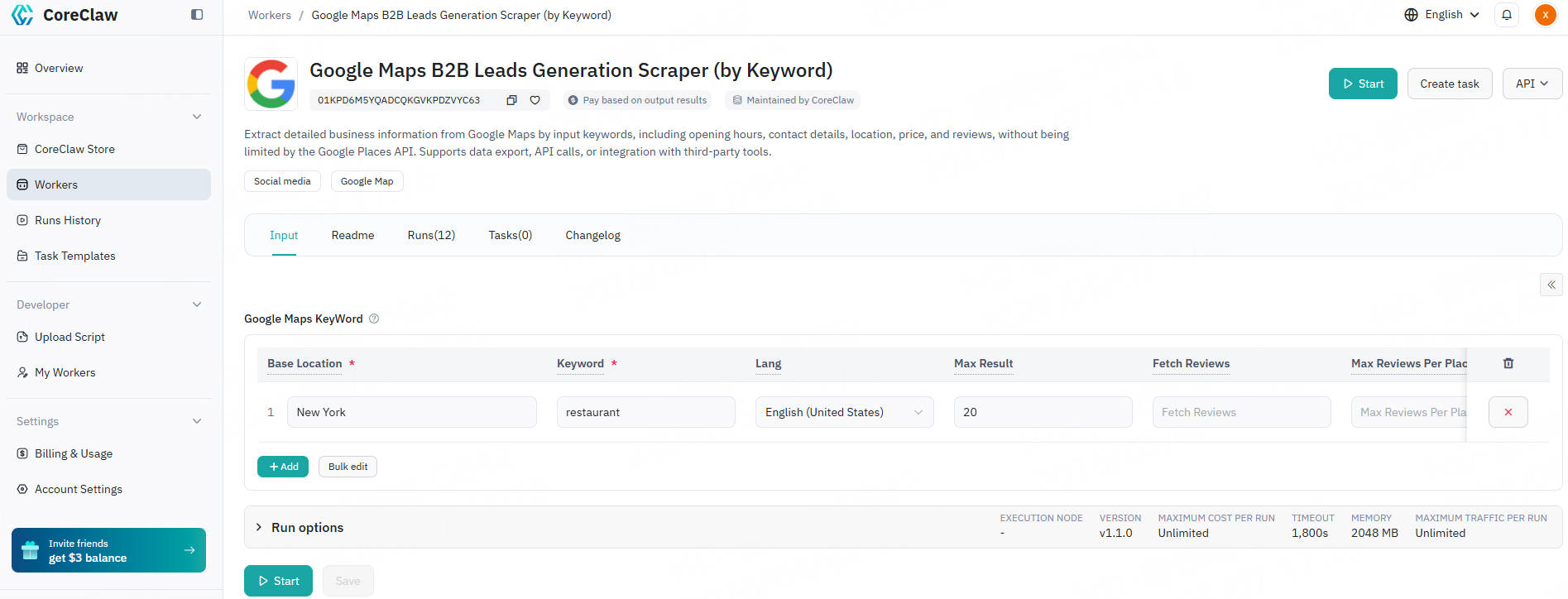
Register a CoreClaw account with your email, then open the Google Maps Local Business Leads Scraper. Just like searching directly in Google Maps, enter your target industry keyword (e.g., gym, dentist) and select a city or region. Supports any country, any language, no format restrictions.
After submitting the task, the tool scans Google Maps in the cloud background—no need to keep your browser open, no local device resources used. The system uses intelligent region partitioning to bypass the official 120-result limit per search, continuously collecting until all matching businesses are covered.
After map data collection, the tool further crawls each business's official website, extracting real business emails from public pages, plus Facebook, Instagram, LinkedIn and other social media links. This step is what free tools can't do—and it's the key to actually launching outreach.
After collection, choose CSV, Excel, or JSON format to download with one click. Import directly into HubSpot, Salesforce, or cold email tools like Instantly and Lemlist—zero processing cost, start outreach immediately.
| Field Category | Field Name | Data Type | Description |
|---|---|---|---|
| Contact Information | phone | Text | Business phone number |
| website | Text | Official website | |
| owner_name | Text | Business owner name | |
| owner_link | Text | Business owner profile link | |
| business_email | Text | Business email (Newly added) | |
| Text | Facebook page (Newly added) | ||
| Text | Instagram account (Newly added) | ||
| youtube | Text | YouTube channel (Newly added) | |
| Text | LinkedIn page (Newly added) | ||
| twitter_x | Text | Twitter / X account (Newly added) | |
| Basic Business Info | title | Text | Business name |
| category | Text | Primary category, e.g. Cafe, Restaurant | |
| categories | Array | All category tags | |
| description | Text | Business introduction | |
| status | Text | Operating status, e.g. Open, Closed | |
| about | Array | Additional business details | |
| Address & Location | address | Text | Full physical address |
| street | Text | Street name | |
| city | Text | City | |
| postal_code | Text | Postal zip code | |
| state | Text | State / Province | |
| country | Text | Country | |
| latitude / longitude | Text | Geographic coordinates | |
| Ratings & Reviews | review_rating | Text | Overall rating score |
| review_count | Text | Total number of reviews | |
| rating_1_count to rating_5_count | Text | Review count by star level | |
| reviews | Array | Detailed user feedback including score, content and username | |
| reviews_link | Text | Review page URL | |
| people_also_search | Array | Related search terms | |
| Operation Details | open_hours | Text | Business hours including holidays |
| popular_times | Object | Hourly peak visiting time | |
| price_range | Text | Price level, e.g. $, $$, $$$ | |
| timezone | Text | Local time zone | |
| plus_code | Text | Google Plus Code | |
| Media & Services | images | Array | Business image URLs |
| thumbnail | Text | Thumbnail image URL | |
| menu | Object | Food menu if available | |
| reservations | Array | Booking service options | |
| order_online | Array | Online ordering options | |
| ID & Links | data_id | Text | Unique data identifier |
| cid | Text | Place CID identifier | |
| owner_id | Text | Business owner ID | |
| url | Text | Google Maps page link | |
| current_page | Text | Pagination page number | |
| Error Handling | error | Text | Error message if exists |
| error_code | Text | Error code if exists |
Enter the business keywords you want to search for on Google Maps, and specify the corresponding country or region for each keyword. Keywords are the actual search terms you would type into Google Maps, such as bakery、gym or bookstore.
To cover more business results, you can combine multiple related but non-duplicate keywords. This usually helps you discover a wider range of places. However, please note that the more keywords you add, the longer the run time will usually be. Instead of stacking many near-synonyms, we recommend using a mix of keywords that reflect different business intents.
If you enter too many highly repetitive keywords, it will often only increase scraping time without significantly improving the number of results.
Recommended keyword examples: bakery, coffee shop, gym, bookstore, florist, pet store, beauty salon
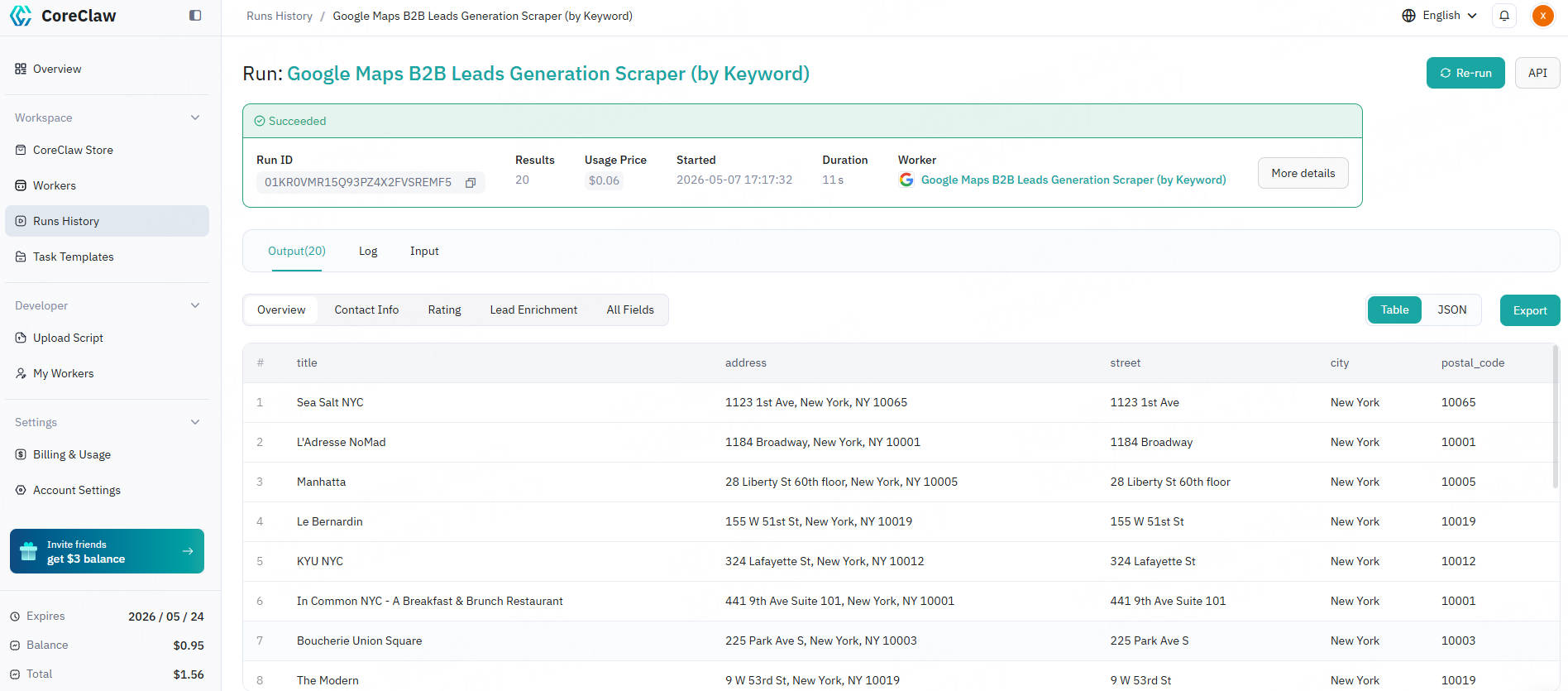
Once the scraping task is complete, the collected Google Maps data will be organized into a structured dataset within the "Output" tab. Please note that for easy viewing, the results are displayed in a table and tab format. You can choose to download the results in CSV or JSON format. Below is an example of results extracted using keyword:
Yes. The tool works in all countries where Google Maps is available—200+ countries and regions worldwide.
Google Maps officially shows only 120 results per search. Our tool uses intelligent region partitioning to bypass this limit and collect all matching businesses in the target area.
Yes. After collecting map data, the tool visits each business's website and extracts publicly available business emails. This is a key differentiator from free tools.
CSV, Excel (.xlsx), and JSON. All formats are ready to import into CRM or cold email tools.
No. The tool is designed for sales professionals—enter keyword and location, click start, download results. Zero coding required.
Yes. After collection, you can filter results by minimum rating, business status (open/closed), or presence of contact info.
The tool collects publicly available business information from Google Maps. Always comply with local regulations and platform terms of service when using the data.
Explore more popular scrapers from our marketplace
by CoreClaw
No-code Google Maps scraper fetches full details of single business. Capture business email, phone, website, social accounts, reviews, opening hours and location data, instantly export complete valid B2B leads.

by CoreClaw
Google Maps Review Scraper bulk extracts star ratings, text, reviewer details, owner responses, and image URLs. Precisely analyze customer sentiment, monitor competitors, optimize local SEO, and comprehensively boost your business reputation. Supports keyword filtering and multilingual translation, delivers structured data.
by Odin Kael
Extract full business data from Google Maps, including name, address, phone number, website, rating, reviews, coordinates and more. Support location keyword search, email extraction and bulk scraping for accurate lead generation.