Go to Store



 View All Scrapers
LinkedIn Jobs Scraper
linkedin-jobs-scraper
Extract public LinkedIn job posting data by job keyword. Capture details such as job title, company name, job description, experience level, salary range, application link, and more. Export the data, access it via API, or integrate it with third-party tools.
by CoreClaw
5
5runs
Try for Free
2,000 Free Results
Last updated:2026-04-10
Version:v1.0.2
What Is the LinkedIn Jobs Scraper?
The LinkedIn Jobs Scraper is an automated recruitment data extraction tool that helps you collect structured job data from LinkedIn at scale. By input job keywords, you can quickly gather standardized job listing data for hiring research, talent trend analysis, and salary benchmarking.
- Scrape multiple job postings at once
- Extract core fields such as job title, job details, required skills, and salary range
- Export data in JSON and CSV formats
- Filter jobs by time range, experience level, employment type, and more
Common Use Cases for the LinkedIn Jobs Scraper
- Hiring market analysis — Analyze hiring demand for specific roles across cities, companies, or industries.
- Salary and seniority research — Track salary ranges, experience levels, and hiring standards in public job listings.
- Competitor hiring monitoring — Monitor competitors’ hiring activity, role focus, and team expansion signals.
- Talent intelligence gathering — Identify trending skills and job market patterns through job requirements and skill tags.
- Recruitment automation and reporting — Import job data into CRM, ATS, BI, or internal talent analytics systems.
What Data Can You Extract from LinkedIn Job Posts?
With this LinkedIn Jobs Scraper, you can extract the following data:
| 💼 Job Title | 🔗 Job URL |
| 🆔 Job ID | 🏢 Company Name |
| 🆔 Company ID | 🔗 Company Profile URL |
| 📍 Job Location | 📝 Job Summary / Job Description |
| 📈 Experience Level | 🧩 Function / Department |
| 🕒 Employment Type | 🏭 Industry |
| 💰 Salary Range | 📅 Posted Date / Extraction Date |
| 👥 Number of Applicants | 📨 Application Link |
| 🖼️ Company Logo | ✅ Easy Apply Status |
| 🌍 Country Code | 📌 Application Availability Status |
How to Scrape LinkedIn Job Data
The LinkedIn Jobs Scraper is no-code and easy to use for both technical and non-technical users.
- Sign up and create your CoreClaw account with your email.
- Open the LinkedIn Jobs Scraper.
- Choose the scraping method: input job keywords.
- Set filters such as location, time range, experience level, job type, or remote option.
- Click the “Start” button and wait for the extraction to complete.
- Download the results in JSON or CSV format.
➡️ Input
Enter your target LinkedIn job keywords and location, along with additional filters such as:
- Job keywords: for example,
product manager,data analyst - Location: for example,
New York - Time range:
Any_time/Past_day/Past_week/Past_month - Experience level:
Internship/Entry_level/Associate/Mid_senior_level/Director - Job type:
Full_time/Part_time/Contract/Temporary/Volunteer - Workplace type:
On_site/Remote/Hybrid
⬅️ Output
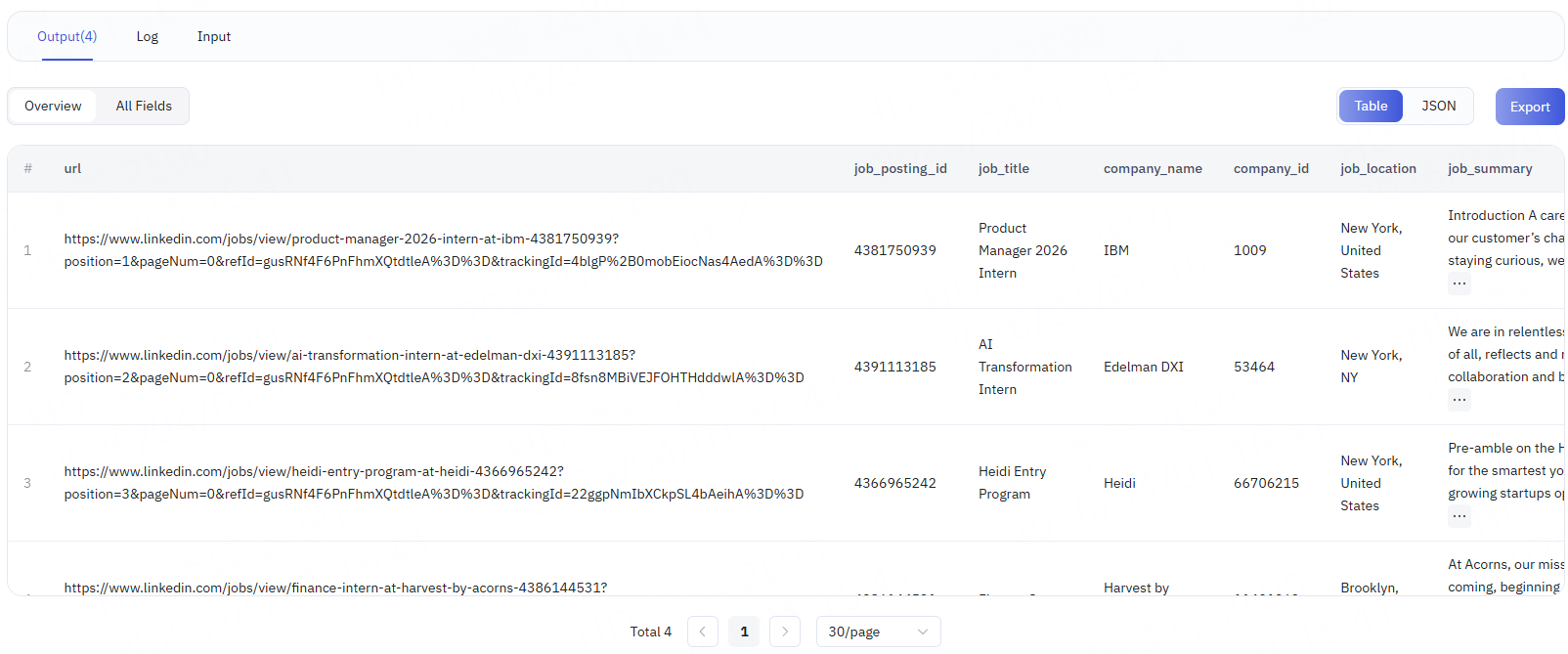
Once the scraping task is complete, the system generates a structured dataset in the Output tab. Results are displayed in table format for easier review and can be downloaded as CSV or JSON files.
FAQ
What data can the LinkedIn Jobs Scraper extract?
The tool currently supports extracting job titles, job details, required skills, salary ranges, company information, and more.
Can I scrape jobs in bulk by keyword?
Yes. You can scrape jobs in bulk using filters such as job keywords, location, time range, experience level, and employment type.
What export formats are supported?
The tool supports JSON and CSV exports.
Do I need coding skills to use it?
No. CoreClaw provides a no-code interface. Simply enter the LinkedIn job search criteria and click “Start.” You can then download the results directly as Excel or CSV files without writing any code.
Is the returned data real-time?
Yes. The tool extracts the latest public data from the target website rather than relying on cached results.
Do you support custom tasks?
Yes. If you need specific fields, large-volume tasks, or more frequent data updates, contact us with your requirements and we can provide a custom solution.
You might also like
Explore more popular scrapers from our marketplace
LinkedIn Company Scraper
by CoreClaw
Extract public company profile data by input LinkedIn company page URL. Capture details such as company name, company size, industry, description, company page link, and more. Export the data, access it via API, or integrate it with third-party tools.
4.7
3 runs
From $1.5/results
LinkedIn People Profile Scraper
by CoreClaw
Extract public LinkedIn People Profile data by URL, including name, headline, location, current company, work experience, education, skills, follower count, and more. Export the data, access it via API, or integrate it with third-party tools.
4.6
19 runs
From $1.5/results
LinkedIn Jobs Data Scraper
by CoreClaw
Extract public LinkedIn job posting data by job listing URL. Capture details such as job title, company name, job description, experience level, salary range, application link, and more. Export the data, access it via API, or integrate it with third-party tools.
4.9
4 runs
From $1.5/results
LinkedIn Jobs Scraper Tool
by CoreClaw
Input LinkedIn job URL to extract public job data, including the job title, company name, job description, experience level, salary range, application link, and more. Supports data export, API calls, and third-party tool integrations.
4.6
6 runs
From $1.5/results