Go to Store



 View All Scrapers
Instagram Comment Scraper
instagram-comment-scraper
Extract public Reel data from Instagram using a list URL, including creator usernames, titles, hashtags, engagement metrics, and more. Outputs structured data and can be integrated into automation workflows or third-party systems.
by CoreClaw
4.6
13runs
Try for Free
2,000 Free Results
Last updated:2026-04-13
Version:v1.0.1
What is Instagram Comments Scraper?
The Instagram Comments Scraper lets you extract structured comment data from public Instagram posts using one or more Post URLs. Just paste the target links, run the scraper, and collect comments, replies, and engagement metrics in a structured format. It is built for user feedback analysis, brand reputation monitoring, competitor research, and comment data collection at scale.
- Scrape comments from multiple posts in one run
- Extract comment text, replies, and engagement fields
- Link commenter data with post-level information
- Well suited for sentiment analysis and audience research
- Export results in CSV or JSON
Compared with manually reading comment threads, this scraper makes it much faster to collect public Instagram comment data at scale and turn it into structured output for analysis, monitoring, and reporting.
Common use cases for the Instagram Comments Scraper
- Comment sentiment analysis: Collect comment text, likes, and reply data in bulk to identify audience concerns, recurring themes, and sentiment patterns.
- Brand reputation monitoring: Track comments on brand-owned posts to understand public perception, controversy, and feedback trends.
- Competitor engagement research: Analyze the tone, structure, and behavior of conversations happening under competitor content.
- Social listening workflows: Extract comments, nested replies, and interaction metrics to support trend analysis and public opinion monitoring.
- Comment data archiving: Turn comment threads into structured datasets for cleaning, clustering, search, and database storage.
What data can you extract from Instagram?
| 💬 Comment text | 👤 Commenter username |
| 🔗 Commenter profile URL | 📅 Comment timestamp |
| ❤️ Comment likes | ↩️ Reply count |
| 🧵 Reply content | #️⃣ Hashtags used in comments |
| 🆔 Comment ID | 🆔 Post ID |
| 👤 Original poster | 🔗 Post URL |
How to scrape Instagram data
The Instagram Comments Scraper is designed to be simple to use, so you can start extracting data quickly even without prior scraping experience.
- Sign up and create your CoreClaw account with your email address.
- Open the Instagram Comments Scraper (Post URL version).
- Add one or more Instagram Post URLs.
- Make sure the links point to publicly accessible post pages.
- Click Start and wait for the extraction to finish.
- Review the structured output and download the results as CSV or JSON.
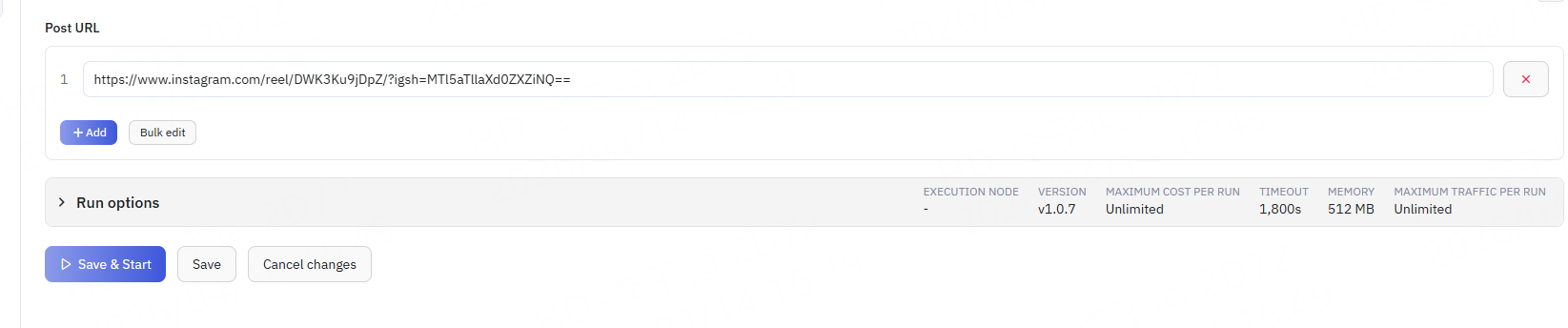
➡️ Input
Enter the Instagram Post URL you want to scrape comments from. Example URL: https://www.instagram.com/reel/DWK3Ku9jDpZ/?igsh=MTl5aTllaXd0ZXZiNQ==
This scraper is best for cases where you already know the exact post you want to analyze and need a fast way to extract comment-thread data, such as user feedback analysis, competitor comment research, or brand reputation monitoring.
Supported input:
post_url: The Instagram post URL to scrape comments from.
Recommended inputs: Brand post URLs, competitor post URLs, trending content URLs Not recommended: Profile URLs, Reel listing pages, private post links, or invalid redirect URLs
⬅️ Output
When the run is complete, the collected Instagram comment data is organized under the Output tab as a structured dataset. For easier review, results are typically shown in a table-like view and can be downloaded in CSV or JSON format.
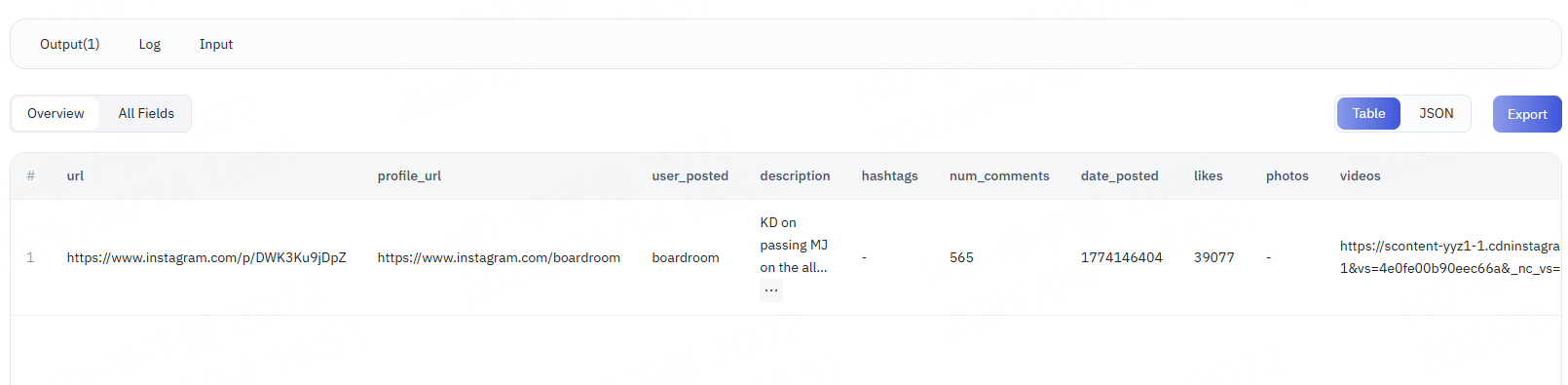
Table example
JSON example
json
FAQ
Is this scraper suitable for sentiment analysis?
Yes. Because it captures comment text, likes, replies, and nested interaction data, it works well for sentiment analysis, complaint detection, keyword clustering, and broader audience feedback research.
Can it extract replies as well as top-level comments?
Yes. The current field set includes both reply counts and reply content, which makes it useful for analyzing deeper discussion threads rather than only surface-level comments.
How is a comments scraper different from a post scraper?
A post scraper focuses on the post itself, such as captions, media, and top-level engagement metrics. A comments scraper is centered on audience feedback, comment content, and reply structure, making it better for conversation-level analysis.
Is it useful for social listening workflows?
Yes. This scraper is a strong fit for social listening because it can extract public comments, nested replies, and interaction signals that support trend analysis and public opinion monitoring.
Can it help identify comments around specific keywords or hashtags?
Yes. Since the output includes comment text and hashtags used in comments, it can support filtering, topic detection, and targeted comment analysis around specific themes.
Which tools work best with the exported data?
CSV is ideal for Excel, Google Sheets, and BI dashboards. JSON is better for databases, scripts, NLP pipelines, and automated analytics workflows.
Is the data returned in real time?
Yes. The current tool description indicates that each request retrieves live public Instagram data rather than relying on cached output.
You might also like
Explore more popular scrapers from our marketplace
Instagram Post Scraper
by CoreClaw
Extract public Instagram post data via URLs, including user info, engagement and profile details. One-click CSV/JSON export, batch scraping, no coding needed.
4.6
4 runs
From $1.5/results
Instagram Profile Scraper
by CoreClaw
Extract public Instagram profile data by input URLs, including usernames, IDs, bios, locations, website URLs, follower counts, and comment counts. Supports data exporting, API integration, and synchronization with third-party tools.
4.7
4 runs
From $1.5/results
Instagram Profile Data Scraper
by CoreClaw
Extract public Instagram profile data by input username, including usernames, IDs, bios, locations, website URLs, follower counts, and comment counts. Supports data exporting, API integration, and synchronization with third-party tools.
4.8
1 runs
From $1.5/results
Instagram All Reel Scraper
by CoreClaw
Extract public Reel data in bulk using Instagram URLs, including creator usernames, captions, hashtags, comment counts, like counts, views, play counts, engagement metrics, and more. Supports data export, API access, and third-party integrations.
4.5
6 runs
From $1.5/results