A TikTok profile viewer is a tool used to view or collect information from public TikTok profiles. For casual users, this may mean opening a profile without using the TikTok app. For marketing, research, and growth teams, it usually means something more practical: collecting public creator data in a structured format.
The key question is not only “Can this profile be viewed?” It is “What data can be collected, cleaned, filtered, exported, and used for analysis?” This article explains what public TikTok profile data may be useful, where the limits are, and how CoreClaw can help teams turn creator research into ready-to-use datasets.
What Is a TikTok Profile Viewer?
A TikTok profile viewer lets users review publicly visible profile information, such as usernames, bios, follower counts, recent videos, and visible engagement signals. Some tools focus on anonymous browsing, while others focus on structured data collection for creator discovery, campaign planning, or market research. Public TikTok viewer tools commonly describe support for viewing profiles, videos, public metrics, and profile statistics.
For business use, a profile viewer is most valuable when it behaves like a data workflow, not just a browser. A structured workflow helps teams compare creators, filter by signals, export results, and review data before making decisions.
What Public TikTok Profile Data Can You Collect?
The exact fields depend on the tool, the public profile, and TikTok’s current page structure. In general, TikTok profile data falls into four useful groups.
Basic Profile Information
Basic profile data helps identify the creator. This may include:
Data Field | Why It Matters |
Username | Unique profile identifier |
Display name | Helps recognize the creator or brand |
Profile URL | Useful for auditing and source tracking |
Bio | Shows positioning, niche, or audience focus |
Avatar or profile image | Helps with manual review |
Verification status | Can indicate brand or public figure credibility |
Audience and Popularity Signals
Audience signals help teams estimate reach. Common public metrics include follower count, following count, total likes, and sometimes profile-level engagement indicators. TikTok scraping and analytics tools commonly mention fields such as followers, following, likes, bios, verified status, and engagement metrics.
These numbers should be treated as signals, not final proof of influence. A creator with fewer followers may still have strong engagement in a niche market.
Content and Engagement Metrics
For influencer discovery, recent content often matters more than profile size. Useful fields may include video URLs, captions, publish dates, hashtags, view counts, like counts, comment counts, share counts, and cover images. Browse AI, for example, describes TikTok account scraping around account stats, videos, view counts, bio links, and cover images.
This data helps teams answer practical questions: Is the creator active? What topics do they post about? Are recent videos performing well? Do they match the brand’s audience?
Bio Links and Category Clues
Bio text, external links, hashtags, and repeated content themes can reveal whether a creator is relevant for a campaign. For example, a beauty brand may look for creators who mention skincare, makeup, tutorials, or product reviews. A SaaS company may look for creators posting about productivity, AI tools, startups, or business education.
A Practical Workflow with CoreClaw
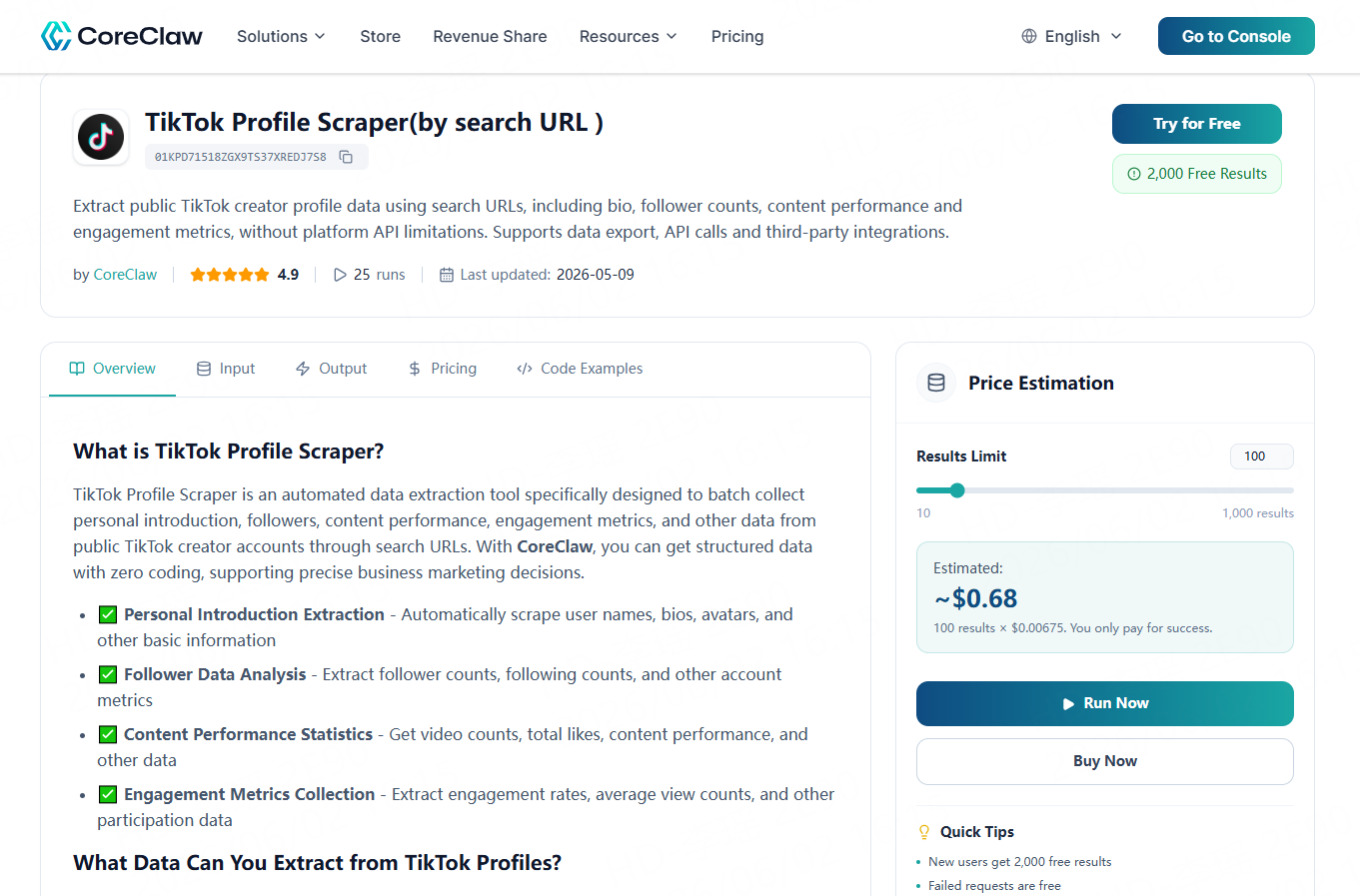
CoreClaw offers a practical way to collect public TikTok profile data without writing code. Instead of manually copying creator information into spreadsheets, teams can use a ready-made Worker such as TikTok Profile Scraper to collect public profile data, content performance, and engagement metrics.
A simple workflow looks like this:
1. Define the creator category, campaign goal, or research topic.
2. Prepare TikTok profile URLs or search-based inputs.
3. Run the CoreClaw Worker.
4. Review cleaned and filtered structured data.
5. Export results to CSV, Excel, JSON, or API.
Filter creators by niche, follower count, engagement, recent activity, or relevance.
This is especially useful for marketing agencies, influencer teams, ecommerce brands, and research teams that need repeatable creator research without building a scraper from scratch.
For more advanced workflows, CoreClaw can also support API-based collection, custom Workers for specific research needs, and developer publishing for teams that want to turn scraping scripts or automation workflows into reusable Workers.
What You Cannot Collect Responsibly
A TikTok profile viewer should not be treated as a way to access private accounts, hidden data, login-only information, or personal data that is not publicly available. Some viewer sites claim anonymous viewing, but responsible business workflows should focus only on public content and avoid tools that ask for suspicious logins, software installs, or private access promises.
TikTok’s own support documentation explains that profile view history is a privacy setting users can manage inside TikTok. For business teams, the safer rule is simple: collect public data, respect platform rules, avoid sensitive information, and review applicable laws before using data for outreach, profiling, or automated decisions.
How Teams Use TikTok Profile Data
TikTok profile data can support several practical workflows:
Use Case | Useful Data |
Influencer discovery | Bio, niche, followers, recent videos, engagement |
Campaign planning | Video topics, hashtags, profile links, audience signals |
Competitor research | Creator partnerships, content patterns, posting activity |
Trend research | Recurring hashtags, high-performing videos, niche topics |
Social listening | Public creator activity and content themes |
Market research | Creator categories, engagement patterns, audience interest |
The goal is not to collect every possible field. The goal is to collect enough clean, filtered data to make better decisions.
Final Thoughts
TikTok profile viewers are most useful when they move beyond simple viewing and help teams collect structured, usable public data.
With CoreClaw, teams can collect public TikTok creator data through ready-made Workers, export cleaned and filtered results to CSV, Excel, JSON, or API, and request custom Workers when the workflow needs more flexibility.
Frequently Asked Questions

Content Writer @CoreClaw · Last Updated 2026-06-02
Lena Kovalenko researches how modern software systems expose and organize information online. Her writing focuses on the interaction between APIs, web platforms, and automated data workflows. When exploring a topic she typically compares multiple tools to understand their design assumptions. These comparisons often lead to articles that help readers see how different technical approaches influence reliability and efficiency.
查看作者资料 →免责声明:CoreClaw 博客上的所有信息均按“原样”提供,仅供参考。对于因您使用 CoreClaw 博客上发布的信息(或通过链接跳转至的任何第三方网站上的信息)而产生的任何后果,CoreClaw 不作任何陈述,亦不承担任何责任。在进行任何数据抓取活动之前,请务必咨询法律顾问,查阅目标网站的服务条款,并在必要时获取许可。